
In this post
Ingress NGINX was retired on March 24, 2026. Kubernetes SIG Network and the Security Response Committee made the call, and since then the project gets no new releases, no bug fixes and no patches for newly found security holes.
Your existing install keeps running, and the Helm chart and images are still downloadable. Because nothing broke on the day, it’s easy to leave it alone until the next CVE lands and there’s no fix coming.
The Kubernetes project points people to Gateway API as the replacement. I wanted to see how painful the move is, so I built a small cluster with ingress-nginx, migrated it to Gateway API with Envoy Gateway, and compared the two side by side before removing nginx. Everything below is from that run, including the parts that didn’t work the first time.
Are you running it?
If you installed it with Helm or the official manifests, the pods carry a standard label:
kubectl get pods -A -l app.kubernetes.io/name=ingress-nginxIf that returns anything, this post is for you. Also check your Ingress objects for ingressClassName: nginx and nginx.ingress.kubernetes.io/* annotations, because those annotations are what make the migration more than a find-and-replace.
The test setup
I ran everything on my Mac (Apple Silicon) with Docker Desktop and kind. Versions:
| Component | Version |
|---|---|
| kind | v0.33.0 |
| Kubernetes | v1.37.0 |
| ingress-nginx (Helm chart / controller) | 4.15.1 / 1.15.1 |
| ingress2gateway | 1.2.0 |
| Envoy Gateway | v1.9.2 |
| Gateway API CRDs (installed by Envoy Gateway) | v1.6.1 |
The app is two tiny http-echo deployments in a shop namespace: web answers “hello from web” and api answers “hello from api”. One Ingress sends /api to api and everything else to web. I added two annotations you’ll find in many real clusters:
apiVersion: networking.k8s.io/v1
kind: Ingress
metadata:
  name: shop
  namespace: shop
  annotations:
    nginx.ingress.kubernetes.io/ssl-redirect: "false"
    nginx.ingress.kubernetes.io/proxy-body-size: "8m"
spec:
  ingressClassName: nginx
  rules:
    - host: shop.local
      http:
        paths:
          - path: /api
            pathType: Prefix
            backend:
              service:
                name: api
                port: { number: 80 }
          - path: /
            pathType: Prefix
            backend:
              service:
                name: web
                port: { number: 80 }
ingress-nginx went in with Helm:
helm repo add ingress-nginx https://kubernetes.github.io/ingress-nginx
helm install ingress-nginx ingress-nginx/ingress-nginx \
  -n ingress-nginx --create-namespace \
  --set controller.service.type=ClusterIP \
  --set controller.admissionWebhooks.enabled=false
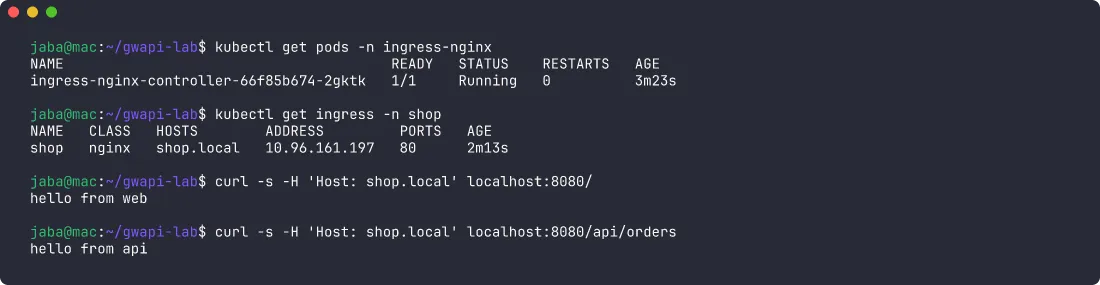
On kind I reach each controller with kubectl port-forward: nginx on localhost:8080, Envoy later on localhost:8081. Here’s the starting point, with both routes working through nginx:
Step 1: convert with ingress2gateway
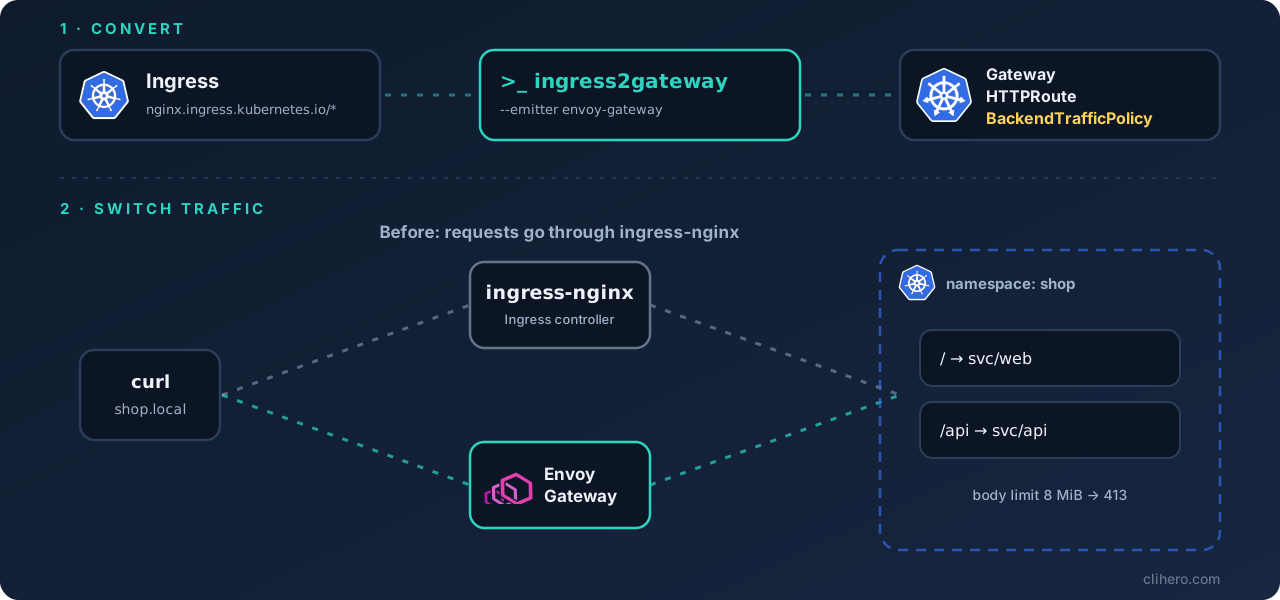
ingress2gateway is the Kubernetes SIGs tool for this. It reads your Ingress objects from the cluster (or from files with --input-file) and prints Gateway API resources. Run it and pay attention to stderr:
ingress2gateway print --providers=ingress-nginx -n shop > gateway-standard.yaml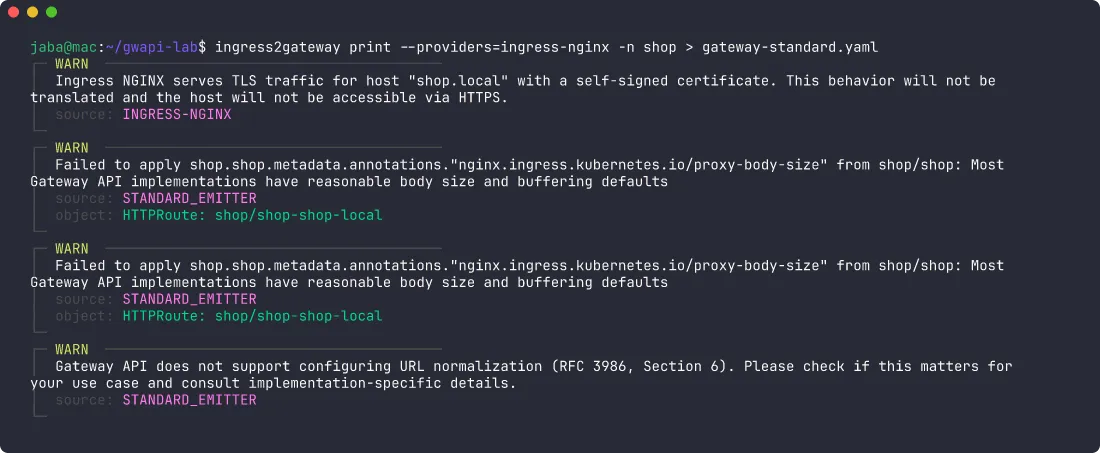
The YAML itself looked fine: a Gateway with an HTTP listener for shop.local and an HTTPRoute with the two path rules. The warnings are what matter, and I’d treat each one as a ticket:
proxy-body-sizewas dropped. Gateway API has no standard field for request body limits, so the default (“standard”) emitter can’t express it.- TLS won’t carry over. ingress-nginx serves HTTPS for every host with its built-in self-signed certificate. Gateway API won’t do that for you, so if you rely on HTTPS you need a real HTTPS listener with
certificateRefs(cert-manager works with Gateway API). - URL normalization isn’t configurable in Gateway API. For most apps this doesn’t matter, but if you have rules that depend on how the proxy cleans up odd paths (
..segments, double slashes, encoded characters), check what your new controller does with them.
Step 2: use the emitter for your controller
The fix for the first warning is in the help output: --emitter. In 1.2.0 it supports agentgateway, airlock-microgateway, envoy-gateway, gce, kgateway and standard. With the emitter for the controller I was moving to, the body size came across as an Envoy Gateway policy:
ingress2gateway print --providers=ingress-nginx -n shop --emitter envoy-gateway > i2g-eg-output.yaml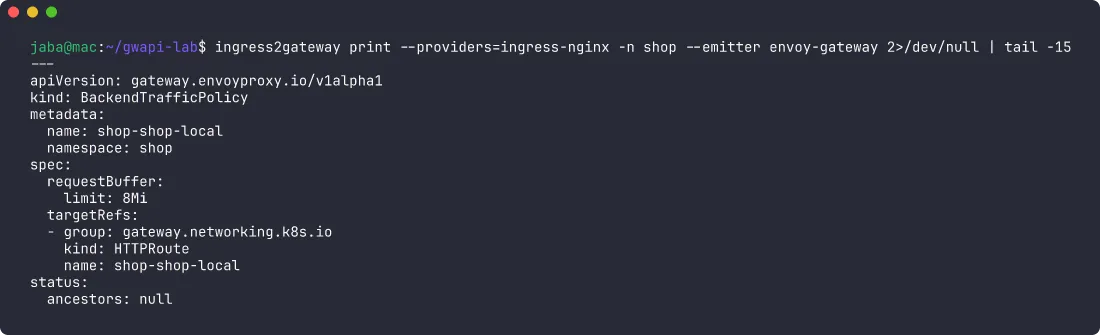
The TLS warning stayed, which makes sense. The emitter can translate settings you wrote down, not a default certificate you never configured.
One thing to change in the generated file before applying it: ingress2gateway names the Gateway and its gatewayClassName after your ingress class, so both come out as nginx. I changed the class to eg (Envoy Gateway) and left the Gateway’s name alone for the test. In a real cluster I’d rename the Gateway too, so nobody reads nginx and assumes nginx is still in the path.
sed 's/gatewayClassName: nginx/gatewayClassName: eg/' i2g-eg-output.yaml > gateway-api.yamlStep 3: install Envoy Gateway
helm install eg oci://docker.io/envoyproxy/gateway-helm --version v1.9.2 \
  -n envoy-gateway-system --create-namespace
The chart installs the Gateway API CRDs as well (v1.6.1 here). Then a GatewayClass and the converted resources:
apiVersion: gateway.networking.k8s.io/v1
kind: GatewayClass
metadata:
  name: eg
spec:
  controllerName: gateway.envoyproxy.io/gatewayclass-controller
kubectl apply -f gatewayclass.yaml -f gateway-api.yaml
kubectl wait -n shop gateway/nginx --for=condition=Programmed --timeout=3mThat wait timed out.

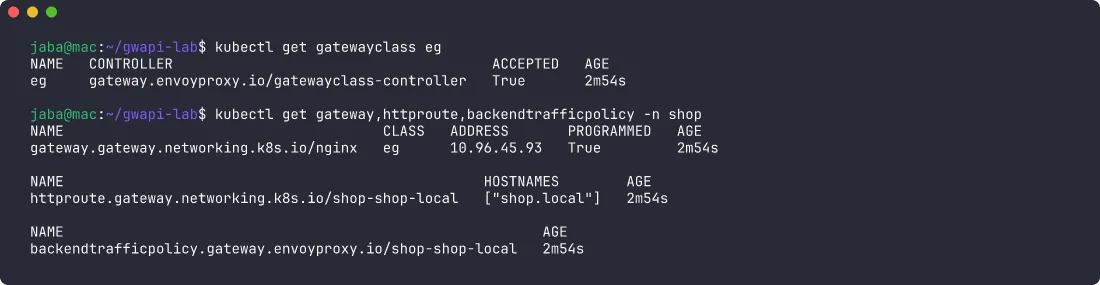
The Gateway condition said AddressNotAssigned. For each Gateway, Envoy Gateway creates a Service of type LoadBalancer, and kind has nothing that hands out LoadBalancer IPs, so the address never arrives and the Gateway never reports Programmed. On a managed cloud cluster the cloud controller provisions the load balancer, so you normally won’t hit this. On kind, or on bare metal without something like MetalLB, you will.
You can run cloud-provider-kind or MetalLB. For a local test I told Envoy Gateway to use a ClusterIP Service instead, through an EnvoyProxy object attached to the GatewayClass:
apiVersion: gateway.envoyproxy.io/v1alpha1
kind: EnvoyProxy
metadata:
  name: clusterip
  namespace: envoy-gateway-system
spec:
  provider:
    type: Kubernetes
    kubernetes:
      envoyService:
        type: ClusterIP
---
apiVersion: gateway.networking.k8s.io/v1
kind: GatewayClass
metadata:
  name: eg
spec:
  controllerName: gateway.envoyproxy.io/gatewayclass-controller
  parametersRef:
    group: gateway.envoyproxy.io
    kind: EnvoyProxy
    name: clusterip
    namespace: envoy-gateway-system
After applying that, the Gateway picked up the ClusterIP as its address and went Programmed within seconds:
Step 4: run both and compare
Both controllers can run at the same time because each one only handles its own class: nginx owns the Ingress, Envoy owns the Gateway. This is the part I’d never skip in production. Point a test hostname, or a small share of traffic, at the new controller and compare before you touch DNS.
Same requests, both controllers:
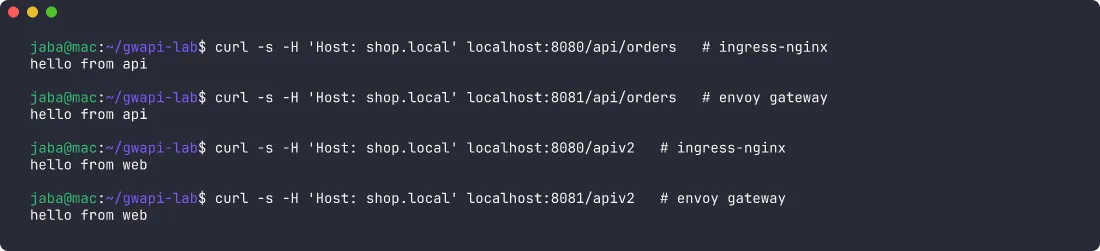
The /apiv2 request is there on purpose. Both Ingress Prefix and Gateway API PathPrefix match whole path segments, so /api does not match /apiv2 and the request falls through to web on both. If your nginx config used regex paths, this is where the two would start to disagree.
Then the body size limit. I sent a 1 MB and a 9 MB POST to each controller from a curl pod inside the cluster:

Both accept 1 MB and reject 9 MB with 413.
A tip from testing this: my first run went through kubectl port-forward and the Envoy tunnel died right after the first 413. When the proxy refuses a body and resets the connection mid-upload, port-forward can drop with lost connection to pod. Envoy was fine. For anything that ends in a reset, test from inside the cluster.
What happens if you skip step 2
The default emitter only warns about the body size, so I deleted the BackendTrafficPolicy to see what that output would do:

Envoy accepted the 9 MB upload that nginx rejected. The request simply goes through, so you only notice the missing limit if you test for it, and anything that relied on it (a cheap guard against huge uploads, for example) stops protecting you. I’d read every ingress2gateway warning before applying anything. (I put the policy back afterwards.)
Step 5: cut over and remove nginx
In a real environment the cutover is a DNS change or a load balancer target switch to the Envoy Service, followed by a few days of watching. In the test I removed the Ingress and uninstalled the chart:
kubectl delete ingress shop -n shop
helm uninstall ingress-nginx -n ingress-nginx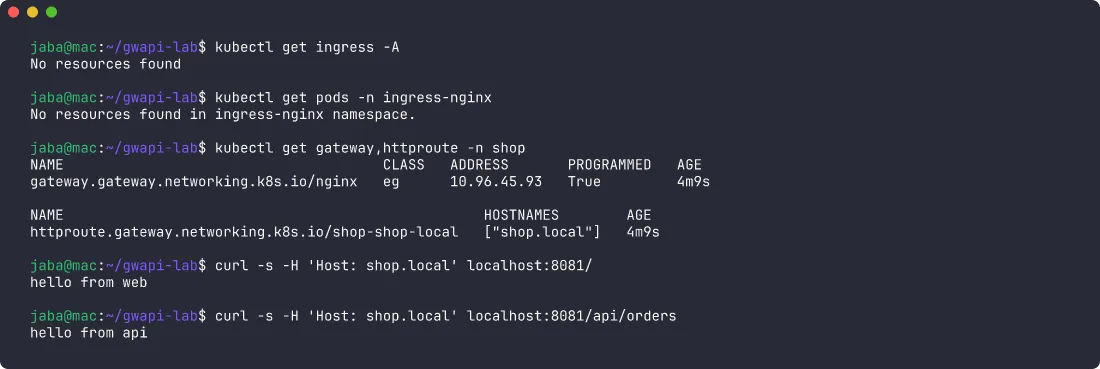
No Ingress objects left, no nginx pods, and the routes still answer through the Gateway.
My checklist
- Find every Ingress with
ingressClassName: nginxand list the annotations in use. The annotations decide how hard this is. - Pick the target controller first, then run ingress2gateway with that controller’s
--emitterif it has one. - Treat every warning as a task: body size, TLS, timeouts, rewrites, auth.
- Plan HTTPS on purpose. The default self-signed certificate doesn’t come along.
- Rename the generated Gateway so
nginxdoesn’t live on in your manifests. - Run both controllers side by side and compare real requests, including edge cases like path prefixes and large bodies.
- Cut over with DNS or the load balancer, then uninstall nginx once traffic has moved.
The whole test, from an empty kind cluster to nginx uninstalled, took about 20 minutes. A cluster with dozens of Ingresses full of rewrite rules and auth snippets will take a lot longer, so the annotation inventory is the first thing I’d do.