
In this post
CopyTo
A real-time shared clipboard. Paste on one device, read it on the other, and back again.
Live at copy.jaba.ge.
I regularly need to move a piece of text from one device to another, and then something back the other way. A URL, a block of config, a snippet of code, a login code. Emailing it to myself, pasting it into a chat, waiting for note-sync to catch up: they all work, and none of them feel instant.
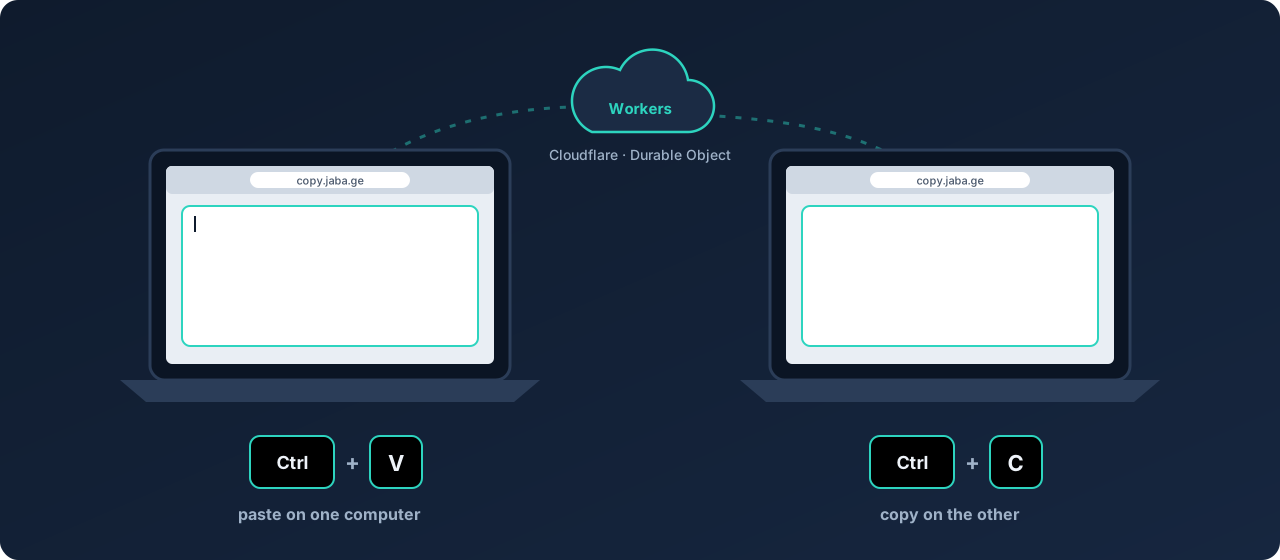
What I wanted was one page open on both machines at once, where whatever I type on one shows up on the other right away, in both directions. No install, no account, no reloading to see changes. Just a shared box of text that both devices are looking at live.
Why Cloudflare Workers
Instant, both directions, reachable from anywhere. That pointed straight at Cloudflare Workers.
It’s serverless, so there’s no machine to run or keep patched. The code runs at the edge, close to wherever I am, which is where the speed comes from. And a single wrangler deploy ships it, with nothing to scale and, at my usage, nothing to pay. For a utility this small, that’s the whole point: the hosting gets out of the way and I’m left with just the code.
The one missing piece: state
A plain Worker is stateless, and two browsers sharing live text is pure state. Something has to hold the current text and tell everyone else the instant it changes.
That is what a Durable Object is: a single, addressable, stateful instance that lives at the edge. It’s a good fit for a WebSocket room, so the design stays small:
- The Worker serves one HTML page and upgrades a
/wsrequest to a WebSocket. - A Durable Object per room holds the current text and pushes every change out to all the connected clients.
A late joiner gets the current text the moment it connects. After that, each edit reaches the other side in a few hundred milliseconds. The messages on the wire are about as plain as they look:
{ "type": "update", "text": "whatever you typed", "rev": 42 }The password is the room
There are no accounts and no list of rooms. The password you type is the room. It gets hashed with SHA-256, and that hash names the Durable Object, so the same password on two devices lands in the same instance. The raw password is never used as an identifier and never stored. Type the same thing on both machines and you share a pane; type something else and you’re on your own.
Rooms don’t live forever
A shared clipboard shouldn’t keep your text sitting around for good. Each room lasts one hour from the moment it’s created: a Durable Object alarm fires at the hour mark, wipes the text and closes the connections. Reconnect after that and you start a fresh, empty room. It keeps old text from lingering.
One guard against guessing
Since any password opens a room, there’s an obvious way to misbehave: sit there trying passwords, hoping to land in one that’s already in use. So each IP can open at most five different rooms per hour. Going back into a room you already opened is free; a sixth new one is turned away and logged, which also lets me watch attempts go past with wrangler tail.
That won’t stop a patient attacker spread across many addresses. The real protection for anything sensitive is a long, unguessable password, because that string is the only thing standing between a room and whoever else types it. The per-IP limit just makes casual guessing from one address slow enough to not be worth it.
The result
One page, no sign-up, no install. Open copy.jaba.ge on both devices, type the same password, and the text follows you across in either direction. Behind it is a single Worker file and two small Durable Objects, one for the room and one for the per-IP limit, and it deploys on a push.
It’s live at copy.jaba.ge, and the source is on GitHub.
Follow along. New posts show up on the RSS feed. I also share my projects on GitHub, MakerWorld and LinkedIn.